Contents
- The 3 core pillars of local search
- How customers discover local businesses
- Expert Google Business Profile optimisation tips
- Your website influences local rankings - What to do about it?
- Why the Google Map Pack matters more than organic rankings
- How to build local authority - Buried's proven tips
- Technical SEO problems that quietly hurt local rankings
- What the Google leak revealed about local SEO
- GEO is changing local SEO faster than most businesses realise
- Download your local SEO checklist (2026)
- Final thoughts
Want to improve your local SEO rankings? First, you need to understand how Google actually decides who shows up and who gets buried on page three with the forgotten blogs of 2014.
The good news? Google has given us more than a few clues. When it comes to local SEO, Google is surprisingly open about what matters. Unlike traditional SEO, where marketers spend half their lives testing theories and arguing on LinkedIn, Google has officially confirmed the main factors behind local search rankings.
According to Google Business Profile documentation, local search results are built around three core pillars, along with a handful of supporting signals.
Quick access - Free local SEO checklist
Short on time? Check out the free local SEO checklist.
The 3 core pillars of local search
Google says local rankings are mainly based on three things: relevance, distance, and prominence.
In plain English? Google wants to show the right business, in the right place, with a trustworthy reputation.
1. Relevance
Relevance is all about how closely your business matches what someone is searching for. If somebody searches for “carpet cleaning”, Google needs to feel confident you actually clean carpets and aren’t just flogging fancy rugs with a vague “home interiors” category slapped on top.
One of the biggest confirmed ranking signals here is the completeness of your Google Business Profile. Google openly recommends adding:
- Accurate business information
- Correct primary and secondary categories
- Services and products
- Business attributes
- Updated contact details
The clearer you are, the easier it is for Google to understand what you do and when to show you. In local SEO, confusion kills rankings.
2. Distance
This one’s fairly straightforward. Google looks at how close your business is to the person searching. If someone types “coffee shop near me”, Google uses the searcher’s device location to work out which businesses are nearby. If they search “coffee shop in Soho”, Google uses Soho as the reference point instead.
And no, there’s no clever loophole here. You can’t “SEO” your way into physically being closer to someone. Google knows where the user is, and your business is where it is.
3. Prominence
Prominence is basically Google’s way of asking: “Does this business seem genuinely established and trusted?”
For famous places, this is easy. Big hotels, museums, and landmarks already have strong real-world recognition. For local businesses, Google builds that picture using online signals.
One of the clearest confirmed factors is reviews. Google explicitly states that more reviews and positive ratings can improve local rankings. But here’s the bit most people miss: review momentum matters more than raw numbers. A business with 200 reviews that consistently gets 20 new reviews every month can often outperform a business with 500 reviews that hasn’t had meaningful activity in ages.
Your wider SEO efforts also influence prominence. Google confirms that your rankings in normal organic search results affect your local visibility too. So yes, traditional SEO still matters. Things like:
- Helpful website content
- Good site structure
- Strong backlinks (links from other websites)
- Fast-loading pages
- Clear service pages
…all feed into local rankings as well.
Google also looks at citations and links across the web. That includes mentions of your business on directories, local websites, news articles, and industry listings.
How customers discover local businesses
Most local SEO advice jumps straight into rankings, keywords, and optimisation tactics. But before any of that happens, there’s a simple customer journey that needs to be understood.
The process is usually simple:
- Someone searches for a service with local intent
- Google shows map pack, organic results, and AI-generated recommendations
- The user chooses a business based on reviews, relevance, and trust signals
Do you know 46% of all searches have local intent, and many users visit a business within 24 hours after searching? That means visibility directly impacts enquiries, calls, and revenue. This is exactly why strong local SEO is crucial for local businesses.
Expert Google Business Profile (GBP) optimisation tips
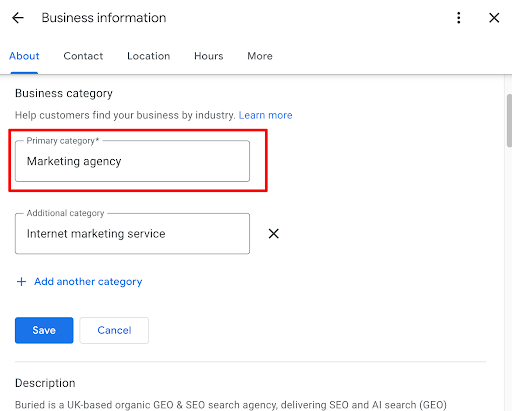
Choose the right primary category
Your primary category is one of the strongest local SEO signals inside your Google Business Profile. Google uses categories to understand exactly what your business does, so choosing the wrong one can limit your visibility before you’ve even started.
If you’re unsure which category to use:
- Look at the businesses ranking well in your area
- Analyse their categories
- Choose the category that best matches your core service
You can also add secondary categories, but relevance is more important than stuffing every possible option into your profile.
Build a consistent review strategy
Reviews directly influence local rankings and customer trust. But local SEO is not a competition to collect the most reviews as quickly as possible. What matters more is steady, natural review growth.
A consistent flow of genuine reviews tells Google your business is active, trusted, and still delivering good experiences. If customers naturally mention:
- Your services
- Your location
- Specific experiences
…that can strengthen local relevance further.
A simple tactic many businesses overlook is using Google’s review QR code inside the shop or office so customers can quickly leave feedback without searching manually.
Also, reply to negative reviews. Most businesses only respond to positive ones and quietly hope the bad reviews disappear on their own. Unfortunately, customers read negative reviews more carefully than positive ones. Professional responses show both Google and potential customers that your business handles problems properly instead of avoiding them.
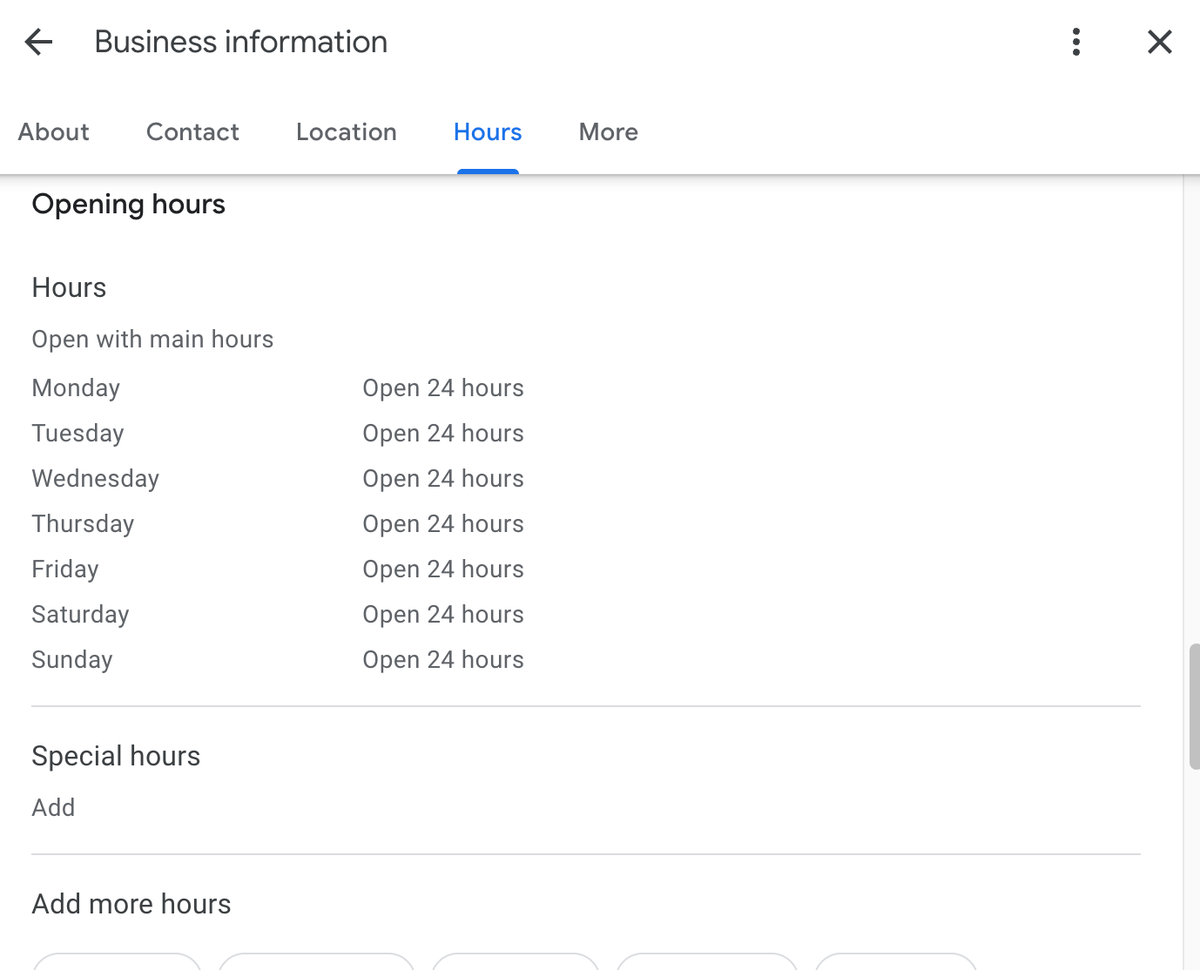
Keep your opening hours accurate
Google prioritises businesses that are currently open when users search. So, if somebody urgently needs a locksmith at midnight, businesses showing “Open Now” immediately gain an advantage.
If you offer:
- Emergency call-outs
- 24-hour support
- Late-night availability
- Weekend services
…make sure your profile reflects that accurately.
Fully complete your Google Business Profile
Many businesses fill in half their profile and stop there. Meanwhile, Google keeps releasing more features that businesses completely ignore.
You should optimise every relevant section, including:
- Business description
- Website links
- Photos
- Services
- Products
- Questions and answers
- Business posts
- Events
Fresh photos are actually more important than you think! You should upload:
- Interior photos
- Exterior photos
- Team photos
- Recent projects
- Product photos
- Day-to-day business activity
An active profile sends much stronger trust signals than a neglected profile with blurry photos from 2018.
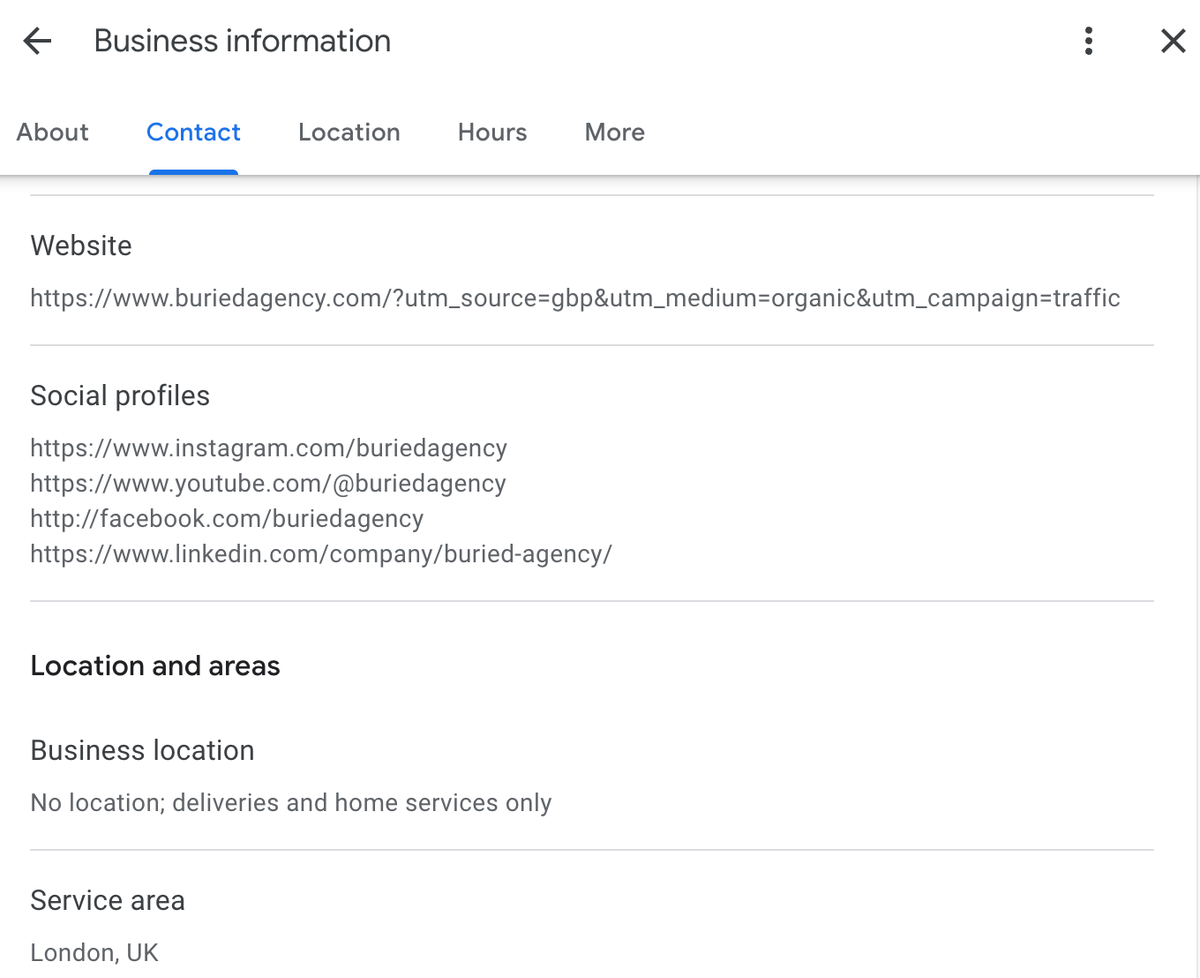
If you’re linking to your website, add UTM parameters (small tracking tags added to links) so you can track traffic properly in Google Analytics 4.
Focus on customer experience
Businesses with better customer experiences usually generate:
- Better reviews
- More engagement
- More repeat customers
- Better behavioural signals
- More word-of-mouth mentions
Good local SEO often follows good businesses. Which is slightly less exciting than hearing about “secret ranking hacks”, but considerably more effective.
Your website influences local rankings - What to do about it?
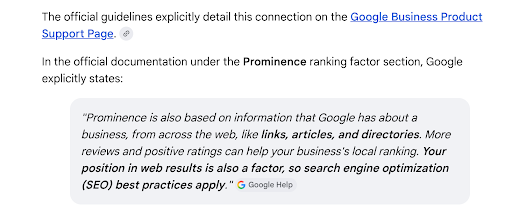
One of the biggest misconceptions in local SEO is that your Google Business Profile does all the heavy lifting. Well, it doesn’t.
Google openly confirms that traditional organic SEO impacts local rankings, too. Your website helps Google understand:
- What you do
- Where you operate
- How trustworthy your business appears
So, what should you do?
Focus on one primary location
Many businesses try to rank everywhere at once and accidentally weaken their relevance everywhere. Instead, focus your core website pages around one primary location.
Use your primary location naturally within:
- Meta titles
- Meta descriptions
- Headings
- Website copy
- Image alt text
You should also embed a Google Map on your contact page to reinforce location relevance. Just avoid forcing location keywords into every sentence like a robot desperately trying to impress the algorithm.
Do not ignore mobile experience
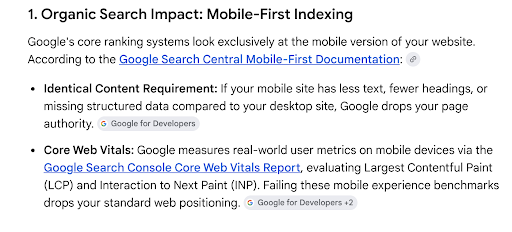
Most local searches happen on mobile devices while people are travelling, comparing businesses, or trying to solve an immediate problem nearby.
Google now primarily uses the mobile version of websites for indexing and ranking through mobile-first indexing, which makes mobile usability a direct SEO consideration, not just a design preference.
If your website:
- Loads slowly
- Has tiny buttons
- Jumps around while loading
- Is difficult to use on mobile
Then, clearly, users leave immediately. Google tracks these engagement signals closely. A poor mobile experience can hurt both organic rankings and Map Pack visibility, especially when combined with poor Core Web Vitals performance (Google’s metrics for loading speed, responsiveness, and visual stability).
Create unique location pages for secondary areas
If your business serves multiple areas, don’t simply duplicate the same page dozens of times and swap the city name.
Years ago, many businesses used tactics like “content spinning” (slightly rewriting the same content repeatedly) to create large numbers of location pages quickly. Now, with AI tools everywhere, many businesses are doing the same thing using mass-generated AI content instead.
The problem is that Google is far better at detecting thin, repetitive, low-value pages today. If every location page says essentially the same thing, they often struggle to rank or even get indexed properly. See how Google also recommends focusing on helpful, people-first content rather than creating pages purely to manipulate rankings.
Instead, create genuinely useful location pages with:
- Unique content
- Area-specific information
- Relevant services
- Local testimonials
- Real photos
And make sure users can actually reach those pages easily through your site structure.
Add FAQs written like real humans
FAQ sections help both traditional search engines and AI search systems understand your services better. But the wording makes a difference.
Write questions the way real customers naturally ask them. Not the strange robotic phrasing SEOs sometimes invent.
Instead of: “What are the benefits of emergency plumbing services in London?”
Write: “Can a plumber come out at night?”
Much better. Add FAQs to key service pages and answer them clearly without overcomplicating things.
Why the Google Map Pack matters more than organic rankings
For local businesses, ranking in Google’s Map Pack is often far more valuable than ranking in standard organic search results.
Those top three map listings usually capture the majority of:
- Calls
- Website visits
- Direction requests
- Leads
So, if your SEO strategy focuses entirely on traditional rankings while ignoring Maps visibility, you’re probably focusing on the wrong battlefield.
How to build local authority - Buried’s proven tips!
Get listed in trusted directories
Backlinks and mentions from other websites act as trust signals for Google. But in local SEO, local relevance often matters more than raw website authority.
How do you achieve this? Make sure your business appears on trusted directories and platforms such as:
- Yelp
- Yell
- Checkatrade
- Tripadvisor
Local directories matter just as much:
- Chamber of Commerce websites
- Local council business directories
- Community association websites
- Neighbourhood platforms
Google loves strong local relevance signals.
Sponsor local events
Supporting local events can quietly become a strong SEO strategy for your business. Sponsoring charity events, sports teams, festivals, and community programmes often earns local mentions and backlinks from trusted local websites. It also makes your business feel more established within the community. Which, funnily enough, is exactly what Google wants to see.
Learn about link building from our experts. It helps you get started on this.
Partner with other local businesses
Building relationships with nearby non-competing businesses can help generate valuable local links and mentions. Things like:
- Local guides
- Cross-promotions
- Collaborative blog content
- Community partnerships
…all strengthen your local authority footprint.
Technical SEO problems that quietly hurt local rankings
Crawlability problems
Before Google ranks a page, it first needs to find it. Many businesses accidentally block important pages through:
- Broken internal linking
- Missing XML sitemaps*
- Blocked folders
- Orphan pages with no internal links
If Google cannot properly crawl your location pages, those pages effectively do not exist in search.
Tip to fix: Make sure all important pages are linked from your main navigation, submit an XML sitemap, and regularly check for broken links.
*Sitemap - A file that helps Google find and understand your website pages.
Indexability problems
Sometimes Google finds a page but still chooses not to include it in search results. This usually happens because of:
- Incorrect noindex tags*
- Broken canonical tags*
- Duplicate location pages
For example, if your “Plumber in Chelsea” page accidentally points its canonical tag back to your homepage, Google may ignore the Chelsea page entirely.
Tip to fix: In Google Search Console, check the “Pages” report to spot pages blocked by incorrect noindex tags or broken canonical tags.
*Noindex tags - Instructions telling Google not to show a page in search results.
*Canonical tags - Signals telling Google which version of a page should be treated as the main one.
JavaScript rendering problems
Many modern websites rely heavily on JavaScript frameworks. The problem is that Google does not always process JavaScript perfectly.
If important business details like NAP information (business name, address, and phone number), reviews, opening hours, service content, and internal links load too late through JavaScript, Google may struggle to see them properly. And to the algorithm, the page can appear incomplete.
Google has even published official guidance for fixing JavaScript-related search issues, which shows how common this problem has become for modern websites.
Tip to fix: Use the Google Search Console URL Inspection Tool to see how Google views your page. Important content like phone numbers, reviews, addresses, and opening hours should appear without relying entirely on JavaScript.
To check if your page has rendering issues:
- Inspect URL in GSC
- Click on view crawled page:
- Copy HTML code
- Open this website (https://html.onlineviewer.net/)
- Compare the live website content with the HTML viewer version, check accordions, FAQs, tabbed content, etc.
Slow mobile performance
Most people searching for local businesses are on their phones, and they are trying to solve an immediate problem. If your website takes too long to load, users bounce quickly and Google notices.
Slow websites hurt many things:
- User experience
- Conversion rates
- Organic rankings
- Map Pack performance
Google also measures page experience using Core Web Vitals (performance metrics focused on loading speed, responsiveness, and visual stability). If your website performs poorly here, it can directly affect visibility.
Tip to fix: Test your website using Google PageSpeed Insights. Compress large images, reduce unnecessary scripts, and check that the site loads properly on mobile devices, not just desktop.
Thin or duplicate location pages
Creating dozens of near-identical location pages no longer works. Google aggressively filters duplicate content now.
The problem is that publishing large volumes of generic AI-written location pages without real local value is unlikely to work long-term, either. Google is getting much better at identifying thin, repetitive content created primarily for rankings rather than helping users.
Each location page should contain genuinely unique information, including:
- Local content
- Different service details
- Local customer reviews
- Area-specific information
- Unique images
Otherwise, those pages often remain unindexed.
Tip to fix: Use Google Search Console to check whether location pages are indexed properly. If pages sit in “Crawled - currently not indexed”, the content is often too similar or too weak.
Missing LocalBusiness schema markup
Schema markup is structured code that helps Google understand your business information more clearly. It can include:
- Business type
- Address
- Opening hours
- Services
- Payment methods
- Coordinates
Without schema, Google has to interpret everything manually. With schema, you hand Google the information directly.
Tip to fix: Test your schema using Schema Markup Validator or Google Rich Results Test to make sure Google can properly read your business information.
Poor internal linking
Many businesses bury important location pages deep inside complicated menus. Google treats pages buried deep within the site structure as less important.
Your important service and location pages should be reachable within one or two clicks from the homepage whenever possible. Simple structures perform naturally better.
Tip to fix: Crawl your website using tools like Screaming Frog SEO Spider to find important pages buried too deep within the site structure.
NAP consistency problems
For years, local SEO agencies obsessed over NAP consistency.
NAP simply stands for:
- Name
- Address
- Phone number
The old belief was that every directory listing needed perfectly identical formatting, or rankings would suffer.
Thankfully, Google is much smarter than that now. Minor formatting differences like:
- Street vs St.
- Suite vs Ste.
- Different phone number formatting
…do not matter. Google’s systems easily recognise these as the same business.
What still matters is accuracy. Problems happen when businesses have:
- Old phone numbers
- Old addresses
- Conflicting contact details
- Outdated listings after moving office
That damages both trust signals and customer experience.
Tip to fix: Search your business name, address, and phone number on Google regularly to check for outdated listings, old contact details, or duplicate business information across directories.
However, simply typing your business name into Google is not always enough, as search results are often personalised. To uncover hidden duplicates or outdated NAP information (business name, address, and phone number), try advanced Google searches like:
Find exact match inconsistencies
- “Old Business Name” + “City”
- “Current Business Name” + “Old Phone Number”
Audit specific directories
- site: yelp.com “Your Business Name”
- site: yell.com “Your Phone Number”
Run exclusion searches
- “Your Business Name” - “Old Address”
If you want to speed things up, tools like BrightLocal Citation Tracker, Moz Local, and Whitespark Local Citation Finder can automatically scan hundreds of directories for duplicate listings and inconsistent business information.
What the Google leak revealed about local SEO
In 2024, leaked internal Google documents gave SEOs a rare look into how Google may process local rankings behind the scenes.
While this was not official guidance from Google, many of the leaked systems strongly matched what local SEOs have suspected for years. Here are some of the biggest local SEO insights from the leak.
Exact match domains still work - But only with quality websites
Exact Match Domains (EMDs) are domains that include the exact service or location keyword, such as:
emergency-plumber-london.co.uk
The leak referenced a system called:
CompressedQualitySignals.exactMatchDomainDemotion
This suggests Google can reduce rankings for low-quality or spammy keyword-stuffed websites. However, EMDs still appear to help local SEO when paired with a genuinely useful, trustworthy website.
Business names and categories carry huge weight
The leak also suggested Google heavily analyses the relationship between:
- Business name
- Primary category
- Website content
- Services
This helps Google define what your business actually is. Which explains why choosing the right primary category inside your Google Business Profile matters so much for local rankings.
It also explains why businesses with naturally keyword-relevant names often perform strongly in the Map Pack.
Google may use real-world foot traffic
One leaked signal called “visitHistory” strongly suggests Google may use real-world visitor data to measure business popularity.
In simple terms, if lots of people physically visit your business, Google may treat that as a trust signal for local rankings.
Which means local SEO is becoming increasingly connected to real-world customer behaviour, not just website optimisation.
User engagement likely impacts rankings heavily
The leak referenced systems like:
- NavBoost
- goodClicks
- badClicks
These signals appear to track how users interact with search results. For local SEO, that could include:
- Clicking your listing
- Calling your business
- Requesting directions
- Staying on your website
- Quickly leaving and choosing a competitor
Which reinforces something many SEOs already suspected: businesses that genuinely satisfy users tend to rank better over time.
GEO is changing local SEO faster than most businesses realise
Local SEO is no longer just about ranking on Google. Search is shifting towards GEO (Generative Engine Optimisation), where AI tools like Google AI Overviews, ChatGPT, and other AI assistants generate answers instead of simply listing websites.
That changes the game completely. Being ranked is still important, but being mentioned consistently across the web now matters just as much.
AI systems build trust by analysing reviews, directories, local citations, brand mentions, website content, and entity signals (Google’s understanding of your business as a real entity).
To adapt, businesses should focus on:
- Strong LocalBusiness schema
- Accurate NAP information (name, address, and phone number)
- Consistent customer reviews
- Conversational FAQ content
- Mentions across trusted third-party platforms
The businesses building strong digital trust signals today will be the ones AI search tools recommend tomorrow.
Check out how digital PR impacts GEO in our expert guide.
Download your local SEO checklist (2026)
Local SEO can feel complex, but execution is what drives results. This checklist turns the entire strategy into a clear, step-by-step action plan you can follow.
Your ultimate local SEO checklist
Go to “File” at the top, select “Download” from the dropdown, and get it in your preferred format.
Use it to:
- Track what is done and what is missing
- Prioritise high-impact actions
- Stay consistent with your SEO efforts
Download the checklist, work through each task, and build your local visibility the right way - steady, structured, and sustainable.
Final thoughts
A lot of local SEO advice online is built around shortcuts. Some of them might work for a while. Most eventually fall apart.
The businesses that consistently perform well are usually the ones doing the fundamentals properly - improving their Google Business Profile, building trust through reviews, fixing technical issues, and creating a strong online presence that both Google and AI search tools can understand confidently.
At Buried, we focus on the stuff that genuinely moves the needle today, whether that’s improving your local visibility, fixing technical SEO issues, strengthening your presence for AI search (GEO), or helping Google better understand and trust your business online.
We don’t believe in weird tricks, keyword stuffing, and nonsense that works for three weeks and disappears after the next update. Our leading GEO and SEO agency offers sustainable local SEO that actually holds up over time.
Ready to improve your local SEO rankings? Contact Buried experts now.
Work with Buried
Speak to a local search expert
Want to win the Map Pack and get recommended by AI search? Tell us about your business and we will build a local SEO plan that holds up over time.
Book a call
About the author
Will Tombs
Founder, Buried
Will Tombs is the Founder of Buried. He’s an award-winning growth marketing specialist and expert in SEO and GEO. With over 12 years’ experience in industry, Will has led digital strategy for: Startups that have gone on to be acquired, international enterprise retailers, and his own e-commerce businesses.
From the blog